Order Entry
There are four sections, or screens to order entry.
(1) The Main Screen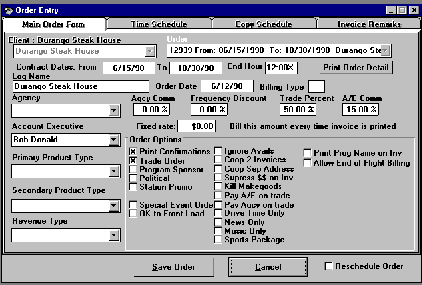
This is where you identify the client, the dates of the contract, the trade percent (if any), ad agency, account executive, and other options.
By clicking on the tabs at the top, you can access the other portions of the order entry screens.
Note that you have the ability to do a percentage of the order in trade. There is space for a frequency discount, an agency commission, a sales rep commission. And for those orders that you bill a fixed rate, you can type in the rate here.
(2) The Flight Screen
You can have an unlimited number of "Flight Lines". On each flight line you describe the time range, the date range, how many spots per day, the length, and the rate. Note on flight #1, there is "In 1 and Out 1". What happens here is that the order will alternate weeks. You can do any combination of "ins" and "outs".
On the second flight you have a 30 second spot, two spots per day during the same date rate, but a different time period.
If we had optioned "Drive Only" on the main screen, then these flights would only rotate during the drive times.
There are may ways that we can option our flights to conform to the specific requirements of the most demanding clients.
(3) The Copy Screen
Once you have entered the flights, you will need to tell the computer which specific copy to run ... and when to run it.
Again, like the Flight Screen, you can be as specific as required.
Note the affidavit information. This is where you would put in information that must be printed on the invoices such as agency codes for each piece of copy.
If this were a coop order, we could enter the coop copy from this screen.
There is also a field for "Talent". If you cut your own carts, and take advantage of this feature, then the computer will try to separate commercials using the same announcer.
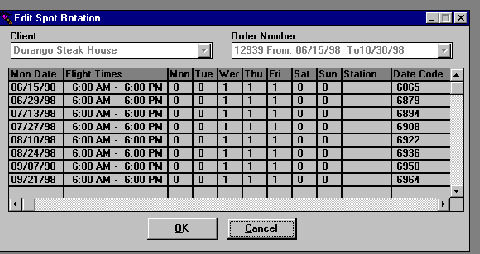 When you
save the order, it writes out a file that you can look at in
"Edit Spot Rotation". Rather than have you
go through
the calendar and put spots in on the appropriate days (which
can
be a real time consumer ... as well as being prone to
mistakes),
this fills out the calendar for you.
When you
save the order, it writes out a file that you can look at in
"Edit Spot Rotation". Rather than have you
go through
the calendar and put spots in on the appropriate days (which
can
be a real time consumer ... as well as being prone to
mistakes),
this fills out the calendar for you.
Of course, with everything in The Traffic C.O.P. for Windows, anything you don't like, you can change. For example, if you want to move a spot off of one of the Fridays and double up on the Thursday, then this is where you would change it.
Note the vertical scroll bar. This is telling us that there is much more to this order and we can scroll down to additional weeks.
Click here to continue your tour
Click here to go back to our home page